
NEC Acostix |
Celebrating 15 Years
|
|
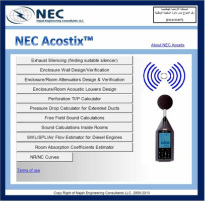
NEC Acostix ™ is an Excel-Based programmed sheets to help engineers and manufacturers design acoustic enclosures and rooms, rectangular silencers, acoustic louvers and do detailed sound calculations to verify their designs. Also it enables designers to design sound attenuation for masonry wall rooms. To get a quote please complete the form and submit.
For more details: Please contact us on support@najahengineering.com or WhatsApp: +962 79 806 1145 NEC Acostix software is present in the market since 2007. We serve the industrial acoustics industry by providing customized solutions and customized tools that enables engineers solve their noise problems easily. NEC Acostix gives best estimates for the sound insulation performance of the enclosure walls, masonry structures, sound attenuators and louvers depending on the supplied data and properties of the materials. Acostix and all its associated tools and modules are Copy Right Protected and Registered Trademark worldwide in accordance to WIPCO covering 195 countries worldwide Please refer to End User Agreement for details |
|
General Features:
All sound calculations meet relevant international standards ASHRAE, ISO and ASTM
All sound calculations meet relevant international standards ASHRAE, ISO and ASTM
- Calculates the required silencer attenuation IL to meet noise criteria.
- Verifies any selected silencer to meet the noise criteria.
- Design acoustic wall or partition to meet certain SRI / TL or certain noise criteria
- Change the wall or partition steel thickness, acoustic filling properties and any covering sheets that affect the absorption.
- Takes into consideration free field and reverberant rooms situations.
- Design rectangular attenuators by allowing you to flexibly adjust all design parameters such as overall aperture size, number of splitters, splitter thickness, air gap between splitters, acoustic filling acoustic properties, perforation sheet configuration, air way length, air flow, flow velocity,…etc
- It uses latest algorithms to predict the performance of splitter duct silencers acoustical performance.
- Takes into consideration inlet air temperature and temperature rise inside enclosures and through the radiators for discharge modules.
- It differentiates between inlet and discharge air sound attenuations by considering the forward and backward flows.
- It calculates pressure drop across all air inlet and discharge attenuation systems.
- Design acoustic louvers by allowing you to flexibly adjust the louver depth, louver blade shape, and louver blade thickness, air gap between blades, louver depth, louver acoustic filling properties and perforation sheet. It allows also adjusting the free area percentage and airflow velocity.
- It will provide the insertion loss for the designed attenuator and sound transmission loss for the louvers.
- The software helps to calculate the best perforation that can achieve best acoustic results.
- The software can estimate diesel engine exhaust noise, surface noise and air flows if not known.
- The software calculates any noise in free filed or inside reverberant rooms either as a single noise figure or over the octave band.
- The software is equipped with a tool to calculate the wall or partition SRI (TL)
- The software is equipped with a tool to calculate average room absorption coefficient over octave band. The software is equipped with a tool to calculate pressure drops for different duct configurations and elbows.
NEC Acostix Modules:
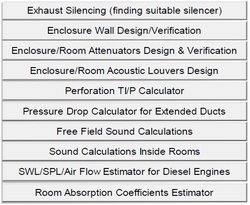
AX-C : Acostix ™ all design and calculation modules. It shall include the following modules: AX-01, AX-02, AX-03, AX-04, AX-06 and AX-07. This is a very power tool for designers of enclosures, attenuators, partitions, louvers and silencers plus they can do sound calculations inside and outside rooms/enclosures including HVAC calculations in accordance to ASHRAE standards.
AX-00 : Acostix ™ Main Module. This include AX-01, AX-02, AX-03, AX-04 and AX-07. It contains all modules except the HVAC Acoustics Module.
AX-01 : Acostix ™ Exhaust silencing module. This module enables you to find suitable muffler insertion loss for a certain engine if you know the engine un-damped exhaust noise SPL or SWL and your acceptance criteria for example: 85 dBA at 1 meter
AX-02 : Acostix ™ Wall / Partitions Design / Masonry Wall (TL/SRI) Module. This module enables the designer to select the wall/windows/doors configuration and get individual transmission loss or overall transmission loss.
AX-03 : Acostix ™ Duct Attenuator Design Module. This enables the designer to specify the dimensional details and acoustic materials specs of the attenuator to get the insertion loss (SIL/DIL). You can also simulate both friction and dynamic pressure losses through the duct.
AX-04 : Acostix ™ Acoustic Louvers Design Module. You select one of five different louver configurations, specify the dimensional details and acoustic materials and then get the transmission loss (TL) and Noise Reduction (NR) along with simulated pressure loss.
AX-05 : Acostix ™ Diesel Generator Sound Attenuation Design Package. Enter the SWL/SPL, dimensional details of enclosure, dimensional details of engine box, engine airflow data, specify inlet and discharge dimensional details, doors and windows. The module will give the enclosure wall SPL at the specified locations. The module has a configuration screen where SWL/SPL data, air flow data, dimensions, temperature rises,..etc are all entered and used all across the other design modules. The package enables to add exhaust ventilation fans in case of remote radiator system is used. The software gives the option to add up to three (3) inlet air system attenuations (attenuators and/or louvers).
AX-06 : Acostix ™ HVAC Acoustics Module. Enter the HVAC duct layout and dimensional and acoustical details, AHU fan SWL and the NC at the recipient room. The module calculates the sound attenuation required that can be achieved either by a sound attenuator or by increasing the duct attenuations. The module is in full compliance to ASHRAE HVAC Applications Reference 2001, Chapter 48 (SI units) and ASHRAE Fundamentals 2013, Chapter 8 (SI Units).
AX-07 : Acostix ™ Sound Calculations Module. This includes free field and inside rooms sound calculations, room average sound absorption coefficient, pressure drop for extended ducts and SPL/SWL/Air flow estimator for industrial machines. This module is essential along with any of the design modules.
AX-C : Acostix ™ all design and calculation modules. It shall include the following modules: AX-01, AX-02, AX-03, AX-04, AX-06 and AX-07. This is a very power tool for designers of enclosures, attenuators, partitions, louvers and silencers plus they can do sound calculations inside and outside rooms/enclosures including HVAC calculations in accordance to ASHRAE standards.
AX-00 : Acostix ™ Main Module. This include AX-01, AX-02, AX-03, AX-04 and AX-07. It contains all modules except the HVAC Acoustics Module.
AX-01 : Acostix ™ Exhaust silencing module. This module enables you to find suitable muffler insertion loss for a certain engine if you know the engine un-damped exhaust noise SPL or SWL and your acceptance criteria for example: 85 dBA at 1 meter
AX-02 : Acostix ™ Wall / Partitions Design / Masonry Wall (TL/SRI) Module. This module enables the designer to select the wall/windows/doors configuration and get individual transmission loss or overall transmission loss.
AX-03 : Acostix ™ Duct Attenuator Design Module. This enables the designer to specify the dimensional details and acoustic materials specs of the attenuator to get the insertion loss (SIL/DIL). You can also simulate both friction and dynamic pressure losses through the duct.
AX-04 : Acostix ™ Acoustic Louvers Design Module. You select one of five different louver configurations, specify the dimensional details and acoustic materials and then get the transmission loss (TL) and Noise Reduction (NR) along with simulated pressure loss.
AX-05 : Acostix ™ Diesel Generator Sound Attenuation Design Package. Enter the SWL/SPL, dimensional details of enclosure, dimensional details of engine box, engine airflow data, specify inlet and discharge dimensional details, doors and windows. The module will give the enclosure wall SPL at the specified locations. The module has a configuration screen where SWL/SPL data, air flow data, dimensions, temperature rises,..etc are all entered and used all across the other design modules. The package enables to add exhaust ventilation fans in case of remote radiator system is used. The software gives the option to add up to three (3) inlet air system attenuations (attenuators and/or louvers).
AX-06 : Acostix ™ HVAC Acoustics Module. Enter the HVAC duct layout and dimensional and acoustical details, AHU fan SWL and the NC at the recipient room. The module calculates the sound attenuation required that can be achieved either by a sound attenuator or by increasing the duct attenuations. The module is in full compliance to ASHRAE HVAC Applications Reference 2001, Chapter 48 (SI units) and ASHRAE Fundamentals 2013, Chapter 8 (SI Units).
AX-07 : Acostix ™ Sound Calculations Module. This includes free field and inside rooms sound calculations, room average sound absorption coefficient, pressure drop for extended ducts and SPL/SWL/Air flow estimator for industrial machines. This module is essential along with any of the design modules.
Wall/Noise Barriers / Walls / Masonry Structures Design and SRI Calculations Tool
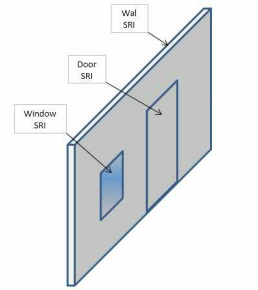
This module calculates the overall SRI (TL) of an acoustic wall or barrier, that may contain doors and windows. The wall can be masonry wall, single steel plate or double steel plate with air gap.
The sheet enables you to select the windows and doors dimensions, Windows glass and thickness configuration. Single plate or double palate configuration.
You need to enter the wall, door and windows dimensions. Then the sheet will calculate the overall SRI of the assembly. This SRI can then be used as a known SRI Value to complete the wall design for enclosure or rooms as stated in wall design sheet above.
The module provides two type of structures: steel plates for enclosures and masonry wall system.
This module calculates the overall SRI (TL) of an acoustic wall or barrier, that may contain doors and windows. The wall can be masonry wall, single steel plate or double steel plate with air gap.
The sheet enables you to select the windows and doors dimensions, Windows glass and thickness configuration. Single plate or double palate configuration.
You need to enter the wall, door and windows dimensions. Then the sheet will calculate the overall SRI of the assembly. This SRI can then be used as a known SRI Value to complete the wall design for enclosure or rooms as stated in wall design sheet above.
The module provides two type of structures: steel plates for enclosures and masonry wall system.
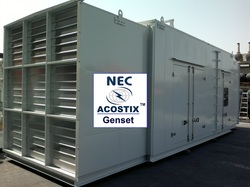
Acoustic Enclosure / Canopy / Room Design for Diesel Generator Sets or any other equipment
- The main module enables you design the acoustic enclosure for diesel generators applications to meet certain noise rating or criteria.
- The module is fed with the engine noise data and then the designer will select the dimensional parameters of the wall, windows, inlet/discharge attenuation, and exhaust silencing to meet the criteria.
- The module allows you to enter either SPL or SWL data. You may also select between baffle type attenuators and acoustic louvers for inlet and discharge aperture attenuations.
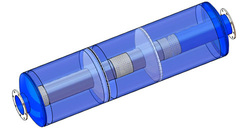
Exhaust Noise Silencing and Calculations:
This module enables to do either do the exhaust noise calculations to find the optimum exhaust silencer attenuations (dB's) at all 8 frequencies, or if you have a silencer with a known dB's you can verify if it suites your diesel engine. Of course, you have to define criteria such as 90 dBA at 1 m or 75 dBA at 7 m and so on. You have to have the engine exhaust noise SPL or SWL data from the engine manufacturer. If not known then you can use the exhaust noise estimator, which is part of NEC Acostix to get the engine exhaust noise.
At the end, the module will give the results and summary of all calculations. You can always hide or show this calculation for the purpose of submittal to your customers.
ExTuner
The ExTuner is a tuning and design tool for reactive and dissipative exhaust silencers in accordance to ASHRAE guidelines. The silencer grade is selected from a drop down list and the size of the muffler (pipe size) is also selected from a drop down list. The software will guide you how to select the body diameter, length, number of chambers, every chamber how it should be designed and what is the size,...etc
This module enables to do either do the exhaust noise calculations to find the optimum exhaust silencer attenuations (dB's) at all 8 frequencies, or if you have a silencer with a known dB's you can verify if it suites your diesel engine. Of course, you have to define criteria such as 90 dBA at 1 m or 75 dBA at 7 m and so on. You have to have the engine exhaust noise SPL or SWL data from the engine manufacturer. If not known then you can use the exhaust noise estimator, which is part of NEC Acostix to get the engine exhaust noise.
At the end, the module will give the results and summary of all calculations. You can always hide or show this calculation for the purpose of submittal to your customers.
ExTuner
The ExTuner is a tuning and design tool for reactive and dissipative exhaust silencers in accordance to ASHRAE guidelines. The silencer grade is selected from a drop down list and the size of the muffler (pipe size) is also selected from a drop down list. The software will guide you how to select the body diameter, length, number of chambers, every chamber how it should be designed and what is the size,...etc
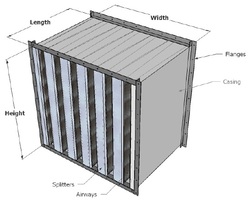
Inlet/Discharge Attenuators Design & Calculations:
This is a powerful design sheet, which does two things at the same time. It designs the rectangular attenuator by finding its dimensional parameters and acoustic characteristics to achieve the noise attenuation from one side and it gives the dimensional parameters that achieve maximum allowable pressure drop across the attenuator air ducts.
The sheet can do 4 functions: design inlet attenuator, design discharge attenuator, verify inlet attenuator and verify discharge attenuator.
You need to enter the engine surface noise SPL data, airflow data, noise criteria; overall aperture height and width and then you select the number of airways and the thickness of the splitters. Of course there are rules how to select them which you can learn in our noise. You can fine-tune your selection to get the best results of acoustic and pressure drop performance. You can always select to show or hide the detailed calculations. The sheet allows you to select the acoustic materials filling details and enter the average room absorption coefficient, which can be calculated by NEC Acostix.
The resultant static and insertion losses can vary from the ones obtained through tests by 1-5 dB in the low frequency and up to 3-9 dB in the higher frequencies but the overall weighted dB will be 0-3 dBA. For more explanations and details please contact support@najahengineering.com
This is a powerful design sheet, which does two things at the same time. It designs the rectangular attenuator by finding its dimensional parameters and acoustic characteristics to achieve the noise attenuation from one side and it gives the dimensional parameters that achieve maximum allowable pressure drop across the attenuator air ducts.
The sheet can do 4 functions: design inlet attenuator, design discharge attenuator, verify inlet attenuator and verify discharge attenuator.
You need to enter the engine surface noise SPL data, airflow data, noise criteria; overall aperture height and width and then you select the number of airways and the thickness of the splitters. Of course there are rules how to select them which you can learn in our noise. You can fine-tune your selection to get the best results of acoustic and pressure drop performance. You can always select to show or hide the detailed calculations. The sheet allows you to select the acoustic materials filling details and enter the average room absorption coefficient, which can be calculated by NEC Acostix.
The resultant static and insertion losses can vary from the ones obtained through tests by 1-5 dB in the low frequency and up to 3-9 dB in the higher frequencies but the overall weighted dB will be 0-3 dBA. For more explanations and details please contact support@najahengineering.com
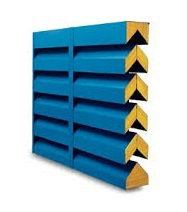
Acoustic Louvers Design and Calculations:
Similarly this design sheet enables to design the acoustic louvers to achieve the required acoustical and airflow performance. You can select either to design inlet or design discharge louvers. You can select among 5 different louver shapes. Other configurations can also be added upon request.
You have to enter the noise source SPL/SWL. You need to enter the selected acoustic filling materials absorption coefficients and thickness. You need also to select the perforation configuration. You have to specify the noise criteria and distance. You can select if the room is reverberant or not and accordingly enter the absorption coefficient data, which can also be calculated by NEC Acostix tools.
Then you can choose your design parameters. Louvers blade thickness, Louver depth, louver blades spacing and free area percentage of the overall aperture.
The software will display the resultant noise and air pressure drop for the selected design. You can fine-tune your design parameters to optimize the results. Of course you can select to show or to hide the calculations before you print the report.
The resultant transmission losses can vary from the ones obtained through tests by 1-5 dB in the low frequency and up to 3-9 dB in the higher frequencies but the overall weighted dB will be 0-3 dBA. For more explanations and details please contact support@najahengineering.com
Similarly this design sheet enables to design the acoustic louvers to achieve the required acoustical and airflow performance. You can select either to design inlet or design discharge louvers. You can select among 5 different louver shapes. Other configurations can also be added upon request.
You have to enter the noise source SPL/SWL. You need to enter the selected acoustic filling materials absorption coefficients and thickness. You need also to select the perforation configuration. You have to specify the noise criteria and distance. You can select if the room is reverberant or not and accordingly enter the absorption coefficient data, which can also be calculated by NEC Acostix tools.
Then you can choose your design parameters. Louvers blade thickness, Louver depth, louver blades spacing and free area percentage of the overall aperture.
The software will display the resultant noise and air pressure drop for the selected design. You can fine-tune your design parameters to optimize the results. Of course you can select to show or to hide the calculations before you print the report.
The resultant transmission losses can vary from the ones obtained through tests by 1-5 dB in the low frequency and up to 3-9 dB in the higher frequencies but the overall weighted dB will be 0-3 dBA. For more explanations and details please contact support@najahengineering.com

Cover Sheets Perforation Configurations and Calculations:
These tools enable you to find the Transparency Index (TI) and the open area percent of the perforated sheet used to cover the acoustic materials used in air ducts. These two parameters affect the acoustic performance of the perforated sheet and therefore affect the overall acoustic performance of the air duct assembly.
Of course, the higher the TI the better it will be for the noise absorption of the acoustic filling but this may not be possible due to the perforation sheet mechanical characteristics and strength.
You enter the perforation geometry and the sheet will calculate the TI and P. These two parameters are inputs to the design of the walls, attenuators and louvers.
The resultant of this sheet are the TI, P and the access factor, which will be multiplied by the absorption coefficient of the acoustic material. In other words, this access factor downgrades the acoustic materials sound absorption capability.
These tools enable you to find the Transparency Index (TI) and the open area percent of the perforated sheet used to cover the acoustic materials used in air ducts. These two parameters affect the acoustic performance of the perforated sheet and therefore affect the overall acoustic performance of the air duct assembly.
Of course, the higher the TI the better it will be for the noise absorption of the acoustic filling but this may not be possible due to the perforation sheet mechanical characteristics and strength.
You enter the perforation geometry and the sheet will calculate the TI and P. These two parameters are inputs to the design of the walls, attenuators and louvers.
The resultant of this sheet are the TI, P and the access factor, which will be multiplied by the absorption coefficient of the acoustic material. In other words, this access factor downgrades the acoustic materials sound absorption capability.
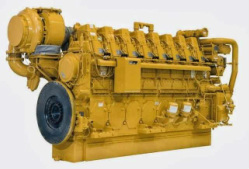
Engine Exhaust Noise/Surface Noise and Air Flow Estimator:
This tool enables the designer to estimate the engine exhaust noise SPL or SWL, engine surface noise SPL and the inlet and discharge airflow.
You just enter the engine KW and then select from the drop down lists different characteristics of the engine, which must be known if the engine is physically available.
The software will display the engine exhaust and surface noise data over the 8 frequencies and the inlet and discharge air flow. These results can be used to design walls, attenuators and louvers if the data is not available from the manufacturer.
This tool enables the designer to estimate the engine exhaust noise SPL or SWL, engine surface noise SPL and the inlet and discharge airflow.
You just enter the engine KW and then select from the drop down lists different characteristics of the engine, which must be known if the engine is physically available.
The software will display the engine exhaust and surface noise data over the 8 frequencies and the inlet and discharge air flow. These results can be used to design walls, attenuators and louvers if the data is not available from the manufacturer.
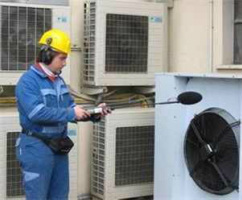
Free Field / Inside Rooms (reverberant) Noise Calculations Tool:
Sometimes you may need to calculate the noise in the free filed if the noise is knows at some location.
This sheet allows for noise calculations of SPL or SWL at different distances in the free field. You can either do the calculation for a single dB figure or over the Eight (8) frequencies.
SPL vs SWL:
The difference between SPL and SWL: SPL is the sound pressure level =20 log P/Pref. Pis sound pressure in N/m2 and Pref = 20 x 10-6 N/m2, while SWL is sound power level = 10 log W/Wref, where W is sound intensity in Watts and Wref = 10-12 Watt. The sound is is coming out from the source as SWL and when it travels spherically its intensity will be distributed over sphere area which makes it pressure SPL
You may also need to do calculations of noise inside the room if the noise source is placed at certain distance and you need to measure noise at certain point inside the room taking into consideration the reverberation time of the room.
This sheet does this. You can do this as a single figure or you can enter the noise data of the source in SPL or SWL over the octave band, and enter all other details of the room.
The resulting information will be the noise level at the point you selected. You can select to show or hide the calculations before printing the report.
Sometimes you may need to calculate the noise in the free filed if the noise is knows at some location.
This sheet allows for noise calculations of SPL or SWL at different distances in the free field. You can either do the calculation for a single dB figure or over the Eight (8) frequencies.
SPL vs SWL:
The difference between SPL and SWL: SPL is the sound pressure level =20 log P/Pref. Pis sound pressure in N/m2 and Pref = 20 x 10-6 N/m2, while SWL is sound power level = 10 log W/Wref, where W is sound intensity in Watts and Wref = 10-12 Watt. The sound is is coming out from the source as SWL and when it travels spherically its intensity will be distributed over sphere area which makes it pressure SPL
You may also need to do calculations of noise inside the room if the noise source is placed at certain distance and you need to measure noise at certain point inside the room taking into consideration the reverberation time of the room.
This sheet does this. You can do this as a single figure or you can enter the noise data of the source in SPL or SWL over the octave band, and enter all other details of the room.
The resulting information will be the noise level at the point you selected. You can select to show or hide the calculations before printing the report.
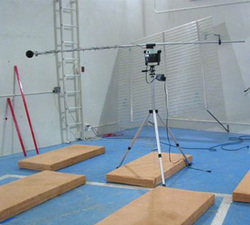
Average Room Absorption Coefficient Calculations Tool
This tool helps designers calculate the room average sound absorption coefficient over the octave band.
The sheet allows to enter the room dimensions, and from the drop down lists one may select the sidewall, end walls, roof and floor material. The results of this sheet will be the average absorption coefficients and the reverberation times. These results are very valuable when calculating sound from inside rooms through walls, attenuators and louvers
This tool helps designers calculate the room average sound absorption coefficient over the octave band.
The sheet allows to enter the room dimensions, and from the drop down lists one may select the sidewall, end walls, roof and floor material. The results of this sheet will be the average absorption coefficients and the reverberation times. These results are very valuable when calculating sound from inside rooms through walls, attenuators and louvers
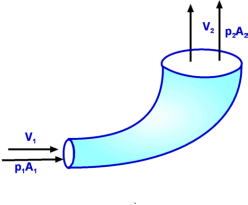
Pressure Drop Calculator Tool:
This sheet helps gives the pressure drop across different duct systems, which you may choose from the drop down list.
It helps when sometimes the inlet air or the discharge air needs to be ducted 45 degrees or 90 degrees for some distance.
This sheet helps gives the pressure drop across different duct systems, which you may choose from the drop down list.
It helps when sometimes the inlet air or the discharge air needs to be ducted 45 degrees or 90 degrees for some distance.

Training and Technical Support:
You can attend the following courses that will enrich your knowledge and skills in noise control and sound attenuation design:
AC-01 Industrial Noise Control and Sound Attenuation Design
4 days course organized publicly or in-house. This is 28 hours of training instruction and
Extensive design workshops covering all the concepts of noise, sound insulation materials and
Design of noise control modules for power generation, residential, HVAC and other applications
AC-02 Architectural Acoustics, Sound in free field and inside rooms, sound reverberation, acoustic
materials, masonry walls and floors acoustics, building materials, sound calculations and sound
attenuation to achieve sound criteria. This training course is only available upon request.
AC-03 Design of exhaust silencers and HVAC silencers including certification to ASTM/ISO Standards
Note: AC-01 is pre-requisite. This training course is only available upon request.
AC-04 NEC Acostix ™ Software training & Users Meeting.
This is a one or two days event that explain the fundamentals of acoustics and then go through
the Acostix ™ software modules with practical exercises and projects
You can register in any of the training courses online or contact training@najahengineering.com
For technical support, you may contact support@najahengineering.com
You can attend the following courses that will enrich your knowledge and skills in noise control and sound attenuation design:
AC-01 Industrial Noise Control and Sound Attenuation Design
4 days course organized publicly or in-house. This is 28 hours of training instruction and
Extensive design workshops covering all the concepts of noise, sound insulation materials and
Design of noise control modules for power generation, residential, HVAC and other applications
AC-02 Architectural Acoustics, Sound in free field and inside rooms, sound reverberation, acoustic
materials, masonry walls and floors acoustics, building materials, sound calculations and sound
attenuation to achieve sound criteria. This training course is only available upon request.
AC-03 Design of exhaust silencers and HVAC silencers including certification to ASTM/ISO Standards
Note: AC-01 is pre-requisite. This training course is only available upon request.
AC-04 NEC Acostix ™ Software training & Users Meeting.
This is a one or two days event that explain the fundamentals of acoustics and then go through
the Acostix ™ software modules with practical exercises and projects
You can register in any of the training courses online or contact training@najahengineering.com
For technical support, you may contact support@najahengineering.com